
AI Fortress: Defense-in-Depth Sandboxing for Coding Agents
The Problem
Coding agents like Claude Code and OpenCode execute shell commands and write files on your behalf. That means arbitrary code runs on your machine with your user’s permissions. A hallucinated rm -rf, a compromised pip package, or a container-escape exploit could damage or exfiltrate anything your user account can touch.
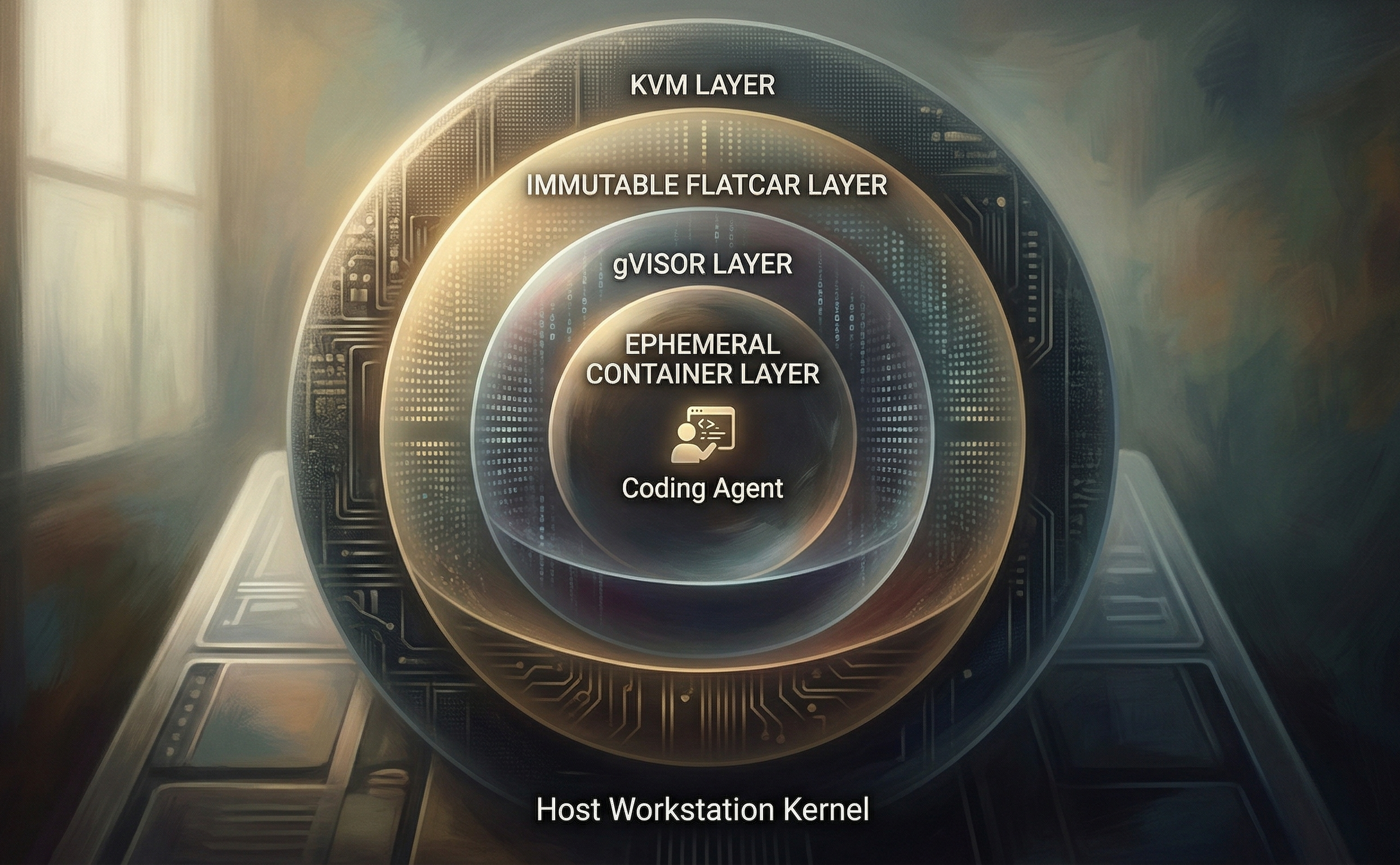
A single Docker container helps, but it still shares the host kernel. One kernel privilege-escalation bug and that boundary is gone. AI Fortress adds four independent layers so one failure mode does not collapse the whole story.
Threat Model
These are the specific risks this project addresses:
- Accidental destruction. The agent misinterprets a prompt and runs a destructive command against the wrong directory.
- Supply chain compromise.
pip installornpm installpulls a package that runs arbitrary code at install time — reads~/.ssh,~/.aws, or~/.gnupgand sends it somewhere. - Container escape. A kernel vulnerability lets a process break out of Docker’s namespaces and access the host. These are discovered regularly (CVE-2024-21626 is a well-known example).
- Cross-project data access. An agent working on Project A reads source code or secrets from Project B.
- Persistent malware. Malicious code modifies the OS to survive a container restart.
No single isolation mechanism covers all of these. The architecture below layers four independent boundaries so that each threat requires breaching multiple layers.
Non-Goals
AI Fortress does not try to be:
- A substitute for code review, dependency pinning, or secrets hygiene. It reduces blast radius for agent-executed code; it does not prove the code is safe or the supply chain is trustworthy.
- Cross-platform desktop convenience. It targets Linux with KVM/libvirt. macOS and Windows hosts are out of scope.
- Network data loss prevention. Outbound traffic from the sandbox is still largely available (see Limitations). It is not a corporate egress filter or zero-trust SaaS.
- A compliance artifact. There is no formal control mapping (SOC 2, FedRAMP, etc.); it is an engineering sandbox pattern.
- Protection of mounted project files from the agent itself. The shared project directory is the deliberate workflow bridge. Malicious or buggy agent behavior can still destroy or leak that tree; the stack isolates the rest of the machine and other projects.
Architecture: Four Nested Layers
The system uses a “Russian Doll” model. Each layer runs inside the one above it.
┌─────────────────────────────────────────────┐
│  Host Workstation (Linux)                   │
│                                             │
│  ┌─────────────────────────────────────┐    │
│  │  Layer 1: KVM Virtual Machine       │    │
│  │  (Flatcar Container Linux)          │    │
│  │                                     │    │
│  │  ┌─────────────────────────────┐    │    │
│  │  │  Layer 2: Immutable Root FS │    │    │
│  │  │                             │    │    │
│  │  │  ┌─────────────────────┐    │    │    │
│  │  │  │  Layer 3: gVisor    │    │    │    │
│  │  │  │  (user-space kernel)│    │    │    │
│  │  │  │                     │    │    │    │
│  │  │  │  ┌─────────────┐    │    │    │    │
│  │  │  │  │ Layer 4:    │    │    │    │    │
│  │  │  │  │ Ephemeral   │    │    │    │    │
│  │  │  │  │ Container   │    │    │    │    │
│  │  │  │  │ (project-   │    │    │    │    │
│  │  │  │  │  scoped)    │    │    │    │    │
│  │  │  │  └─────────────┘    │    │    │    │
│  │  │  └─────────────────────┘    │    │    │
│  │  └─────────────────────────────┘    │    │
│  └─────────────────────────────────────┘    │
└─────────────────────────────────────────────┘
Layer 1: KVM Virtual Machine
The agent never touches the host kernel. A dedicated VM runs via QEMU/libvirt with 16 GB RAM and 4 vCPUs. The host shares project files into the VM using virtio-fs, a high-performance filesystem passthrough — the agent edits files that are immediately visible on the host, but the VM has no access to the rest of the host filesystem.
The virt-install invocation:
virt-install \
  --connect qemu:///system \
  --name ai-fortress \
  --ram 16384 --vcpus 4 \
  --os-variant fedora-coreos-stable \
  --import \
  --disk path=ai-fortress-snapshot.qcow2,format=qcow2 \
  --network network=default \
  --memorybacking source.type=memfd,access.mode=shared \
  --filesystem type=mount,accessmode=passthrough,driver.type=virtiofs,\
source.dir=/home/user/projects,target.dir=host_projects \
  --qemu-commandline="-fw_cfg name=opt/org.flatcar-linux/config,\
file=/var/lib/libvirt/images/config.json"
(--os-variant fedora-coreos-stable is the closest libvirt match for Flatcar’s CoreOS lineage; confirm against your libvirt version if provisioning fails.)
The disk is a copy-on-write overlay (qcow2 backed by the pristine Flatcar image), so the base image is never modified. Destroying and recreating the VM resets everything.
Layer 2: Immutable Root Filesystem
The VM runs Flatcar Container Linux, a minimal OS designed to run containers and nothing else. Its root filesystem is read-only. If something manages to escape the container and gVisor layers, it cannot persist changes to the OS. Rebooting the VM restores the original state.
The VM is provisioned using Butane/Ignition, which declaratively defines users, mounts, and services:
variant: flatcar
version: 1.1.0
systemd:
  units:
    - name: projects.mount
      enabled: true
      contents: |
        [Mount]
        What=host_projects
        Where=/projects
        Type=virtiofs
    - name: install-gvisor.service
      enabled: true
      contents: |
        [Unit]
        ConditionPathExists=!/opt/bin/runsc
        After=network-online.target
        [Service]
        Type=oneshot
        ExecStart=/usr/bin/curl -L https://storage.googleapis.com/gvisor/releases/release/latest/x86_64/runsc -o /opt/bin/runsc
        ExecStart=/usr/bin/chmod +x /opt/bin/runsc
gVisor installs automatically on first boot. The ConditionPathExists guard prevents re-downloading on subsequent boots.
Layer 3: gVisor User-Space Kernel
Docker containers normally share the host kernel — syscalls from inside the container go directly to the host kernel. gVisor interposes a user-space kernel (runsc) that intercepts and re-implements those syscalls. The container process never talks to the real kernel.
This means a kernel exploit crafted inside the container hits gVisor’s Go implementation, not the Linux kernel. The attack surface is fundamentally different and much smaller.
Docker is configured to use gVisor as a runtime:
{
  "runtimes": {
    "runsc": {
      "path": "/opt/bin/runsc"
    }
  }
}
Every agent container is launched with --runtime=runsc.
Layer 4: Ephemeral, Project-Scoped Containers
Each agent session runs in a fresh container that mounts only the target project directory. The agent-up script:
docker run -it --rm \
  --user $(id -u):$(id -g) \
  --name "agent-$PROJECT_NAME-$(date +%s)" \
  --runtime=runsc \
  --security-opt label=disable \
  -v "$PROJECT_PATH:/work" \
  -w /work \
  -e OPENCODE_API_KEY \
  -e ANTHROPIC_API_KEY \
  -e OPENAI_API_KEY \
  $IMAGE
Key properties:
--rm: The container is destroyed when the agent exits. No state persists.-v "$PROJECT_PATH:/work": Only/projects/<name>is mounted. An agent working onproject-acannot seeproject-b.--user $(id -u):$(id -g): Files created inside the container have the correct host ownership. No permission fixups needed.--security-opt label=disable: Disables SELinux labeling inside the container. This is necessary because gVisor’srunscruntime conflicts with SELinux enforcement inside the VM. The trade-off is acceptable here because gVisor provides syscall-level containment; you lose MAC labeling inside the guest, not host SELinux on the workstation (the host runs separately).
What an Exploit Would Require
To go from “code running inside the agent container” to “code running on the host workstation,” an attacker would need to:
- Escape gVisor — break out of the user-space kernel to reach the real Linux kernel inside the VM. gVisor is written in Go with memory safety and has a dedicated security team. Escapes have occurred but are rare.
- Escape the VM’s Docker namespaces — after reaching the VM’s kernel, escalate from the container’s PID/mount/network namespaces to the VM’s root namespace.
- Persist past Flatcar’s immutable root — write something that survives a reboot, which requires modifying the read-only root filesystem or the Ignition config.
- Escape KVM — break out of the virtual machine to reach the host kernel. KVM/QEMU escapes exist but are high-value, high-difficulty exploits.
Each of these is a distinct, well-studied security boundary. Chaining all four is a different proposition than breaking any one of them.
Usage
Setup (one-time)
# Download Flatcar and create a CoW snapshot
./get_image.sh
./make_overlay.sh
./set_image_perms.sh

# Generate Ignition config from Butane
docker run --rm -i quay.io/coreos/butane:release < config.bu > config.json
sudo mv config.json /var/lib/libvirt/images/

# Provision the VM
./do_virt_install.sh
The VM boots, installs gVisor, mounts the shared projects directory, and is ready.
Daily Use
source fortress_helpers.sh

# Launch an agent sandbox for a project
agent my-project

# Or use the Python dev environment
agent my-project python
The agent shell function SSHs into the VM and runs agent-up, which starts the gVisor-sandboxed container. The agent gets a shell (or the OpenCode TUI) inside /work, which maps to ~/projects/my-project on the host.
Reset
# Destroy the VM and recreate the overlay from the pristine base image
./burn_it_down.sh
./do_virt_install.sh
This takes a few minutes and gives you a clean environment with no residue from previous sessions.
Supported Agents
The agent-up script selects a container image based on the second argument:
| Type | Image | What you get |
|---|---|---|
default |
ghcr.io/anomalyco/opencode:latest |
OpenCode TUI |
python |
ai-fortress/python-dev:latest |
Python 3.12, pytest, ruff, black, numpy, pandas, git, bash |
Adding a new agent type means adding a case to the script:
case $TYPE in
  python) IMAGE="ai-fortress/python-dev:latest" ;;
  node)   IMAGE="ai-fortress/node-dev:latest"   ;;
  *)      IMAGE="ghcr.io/anomalyco/opencode:latest" ;;
esac
API keys (ANTHROPIC_API_KEY, OPENAI_API_KEY, OPENCODE_API_KEY) are passed as environment variables. They’re forwarded from the host through SSH into the container — they exist in memory only, never written to disk inside the sandbox.
Design Decisions
Why gVisor instead of Kata Containers? Kata runs a separate VM per container, which would mean nesting VMs. gVisor achieves syscall-level isolation without a second hypervisor layer, and it integrates as a standard Docker runtime.
Why Flatcar instead of a general-purpose distro? Flatcar’s immutable root is the default, not an add-on. There’s no package manager to accidentally run, no writable system directories to tamper with. It exists to run containers.
Why virtio-fs instead of full isolation? The purpose of the shared mount is to let developers edit files on the host while agents work inside the sandbox. This is a deliberate choice — the project directory is the intended interface between host and agent. Everything else is isolated. Trust model: anything with code execution inside the VM can read and write whatever projects you mount; the stack protects the rest of the host, not the mounted trees.
Why --security-opt label=disable? gVisor’s runsc runtime doesn’t integrate with SELinux’s labeling system. Disabling labels avoids conflicts. In this design, gVisor supplies the main containment story inside the guest.
Why copy-on-write disk overlay? The base Flatcar image stays pristine. The overlay captures all writes during a session. burn_it_down.sh deletes the overlay and creates a fresh one — a full reset in seconds, not a reinstall.
Limitations
- Linux host required. The setup depends on KVM, libvirt, and QEMU. It won’t run on macOS or Windows natively.
- No network policy enforcement. Containers have outbound network access (needed for package installation). A compromised agent could exfiltrate data over the network. Adding firewall rules or a network proxy would close this gap.
- Single VM for all projects. All sandboxed containers share one Flatcar VM. Separate VMs per project would add another isolation layer at the cost of memory and startup time.
- Bootstrap supply chain. The Ignition unit downloads
runscwithcurlwithout a documented checksum or signature step. A compromised or MITM’d download undermines the whole stack; pin a version and verify out-of-band. - virtio-fs is a shared trust boundary. Compromise of the guest with access to the mount can corrupt or steal host-side project files in the shared directory. That is intentional for workflow, not a bug — but it is not “air gap.”
- No automated testing. Verification that the layers work correctly is manual. A test suite that attempts known escapes and confirms they fail would strengthen confidence.
- Manual setup. The provisioning process involves several steps. A single
makeor wrapper script could reduce it to one command.
Summary
AI Fortress stacks four independent isolation layers — KVM, immutable OS, gVisor, and ephemeral project-scoped containers — between a coding agent and your workstation. Each layer addresses a different class of threat. The entire stack uses mature, open-source components (libvirt, Flatcar, gVisor, Docker) and runs on commodity Linux hardware. Setup takes a handful of commands, daily use is a single agent <project> call, and a full reset takes minutes.
The source is at github.com/ranton256/ai-fortress under the MIT license.